Capacity Tracker Tally Counter4.0.1
Publisher Description

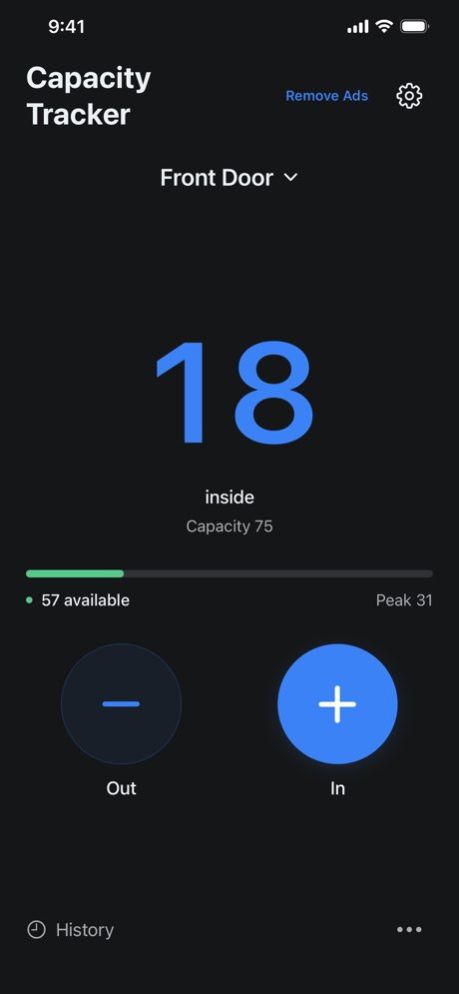


Know how many are inside, how much space is left, and when you are approaching capacity.
Capacity Tracker is a simple tally counter for room occupancy, event attendance, and everyday headcounts. Large In and Out controls keep counting quick, while a clear display puts your current count front and center.
COUNT WITH CONFIDENCE
Add arrivals and subtract departures with a tap. See the current count, maximum capacity, available space, and peak count together. A color-coded capacity bar helps you spot a busy room, and an over-capacity message makes the limit clear.
SET UP YOUR SPACE
Name your location and set its capacity. Use Capacity Tracker at a venue entrance, church service, classroom, shop, reception desk, gym, or community event.
DESIGNED TO STAY SIMPLE
Choose light mode, dark mode, or your device's appearance. The uncluttered counter keeps the essentials within reach, with large controls and a readable layout.
PROTECT YOUR COUNT
Resetting requires you to type RESET and confirm, helping prevent accidental resets. Your count is saved locally so you can return to it later.
KEEP A RECORD
Sign in to save counting sessions and view your history. Basic counting works without an account.
AD-FREE YEARLY
Capacity Tracker includes ads and an optional one-year, auto-renewing subscription that removes all ads while active. The price is shown in the app before you subscribe. Payment is charged to your Apple Account. The subscription renews automatically unless canceled. Manage or cancel it in your Apple Account settings.
Privacy Policy: https://www.capacitytrackerapp.com/privacy
Terms of Use (EULA): https://www.apple.com/legal/internet-services/itunes/dev/stdeula/
Version History Fixed a crash that could occur shortly after opening the app on iOS 27. 4.0.1 Sep 27 * Added new Dark Mode to make all easier on the eyes or just cooler that matches device display mode.
* Updates under the hood to keep things humming along
* Discounted some bugs 3.0 03/31/2023 Improvements under the hood and a shiny new share button. 2.1 12/28/2021 Now you can save the number visitors to your office, business, hours of worship, event and more to the new Tracking History with no limits. We have also included a FAQs section to help you use the app.
Thanks for using Capacity Tracker. Remember to take care of yourself and stay safe out there. 2.0 09/16/2021 Fresh coat of paint and some backend enhancements. 1.1 05/07/2021 We are always trying to improve the app. This release includes bug fixes and some under the hood improvements. 1.0.4 12/22/2020 We made some improvements on the backend and fixed some bugs. 1.0.3 12/15/2020 Detracted a bug. 1.0.2 11/04/2020 Small design tweaks and bug fixes. 1.0.1 11/03/2020 1.0 10/29/2020
About Capacity Tracker Tally Counter
The company that develops Capacity Tracker Tally Counter is 1AM STUDIOS LLC. The latest version released by its developer is 4.0.1.
To install Capacity Tracker Tally Counter on your iOS device, just click the green Continue To App button above to start the installation process. The app is listed on our website since 2026-10-13 and was downloaded 3 times. We have already checked if the download link is safe, however for your own protection we recommend that you scan the downloaded app with your antivirus. Your antivirus may detect the Capacity Tracker Tally Counter as malware if the download link is broken.
How to install Capacity Tracker Tally Counter on your iOS device:
- Click on the Continue To App button on our website. This will redirect you to the App Store.
- Once the Capacity Tracker Tally Counter is shown in the iTunes listing of your iOS device, you can start its download and installation. Tap on the GET button to the right of the app to start downloading it.
- If you are not logged-in the iOS appstore app, you'll be prompted for your your Apple ID and/or password.
- After Capacity Tracker Tally Counter is downloaded, you'll see an INSTALL button to the right. Tap on it to start the actual installation of the iOS app.
- Once installation is finished you can tap on the OPEN button to start it. Its icon will also be added to your device home screen.
Program Details
System requirements
Download information
Pricing
Version History
version 4.0.1
posted on 2026-10-13
Version History Fixed a crash that could occur shortly after opening the app on iOS 27. 4.0.1 Sep 27 * Added new Dark Mode to make all easier on the eyes or just cooler that matches device display mode.
* Updates under the hood to keep things humming along
* Discounted some bugs 3.0 03/31/2023 Improvements under the hood and a shiny new share button. 2.1 12/28/2021 Now you can save the number visitors to your office, business, hours of worship, event and more to the new Tracking History with no limits. We have also included a FAQs section to help you use the app.
Thanks for using Capacity Tracker. Remember to take care of yourself and stay safe out there. 2.0 09/16/2021 Fresh coat of paint and some backend enhancements. 1.1 05/07/2021 We are always trying to improve the app. This release includes bug fixes and some under the hood improvements. 1.0.4 12/22/2020 We made some improvements on the backend and fixed some bugs. 1.0.3 12/15/2020 Detracted a bug. 1.0.2 11/04/2020 Small design tweaks and bug fixes. 1.0.1 11/03/2020 1.0 10/29/2020
version 4.0.1
posted on 2026-10-02
Version History Fixed a crash that could occur shortly after opening the app on iOS 27. 4.0.1 4d ago * Added new Dark Mode to make all easier on the eyes or just cooler that matches device display mode.
* Updates under the hood to keep things humming along
* Discounted some bugs 3.0 03/31/2023 Improvements under the hood and a shiny new share button. 2.1 12/28/2021 Now you can save the number visitors to your office, business, hours of worship, event and more to the new Tracking History with no limits. We have also included a FAQs section to help you use the app.
Thanks for using Capacity Tracker. Remember to take care of yourself and stay safe out there. 2.0 09/16/2021 Fresh coat of paint and some backend enhancements. 1.1 05/07/2021 We are always trying to improve the app. This release includes bug fixes and some under the hood improvements. 1.0.4 12/22/2020 We made some improvements on the backend and fixed some bugs. 1.0.3 12/15/2020 Detracted a bug. 1.0.2 11/04/2020 Small design tweaks and bug fixes. 1.0.1 11/03/2020 1.0 10/29/2020
version 3.0
posted on 2026-09-25
Version History * Added new Dark Mode to make all easier on the eyes or just cooler that matches device display mode.
* Updates under the hood to keep things humming along
* Discounted some bugs 3.0 03/31/2023 Improvements under the hood and a shiny new share button. 2.1 12/28/2021 Now you can save the number visitors to your office, business, hours of worship, event and more to the new Tracking History with no limits. We have also included a FAQs section to help you use the app.
Thanks for using Capacity Tracker. Remember to take care of yourself and stay safe out there. 2.0 09/16/2021 Fresh coat of paint and some backend enhancements. 1.1 05/07/2021 We are always trying to improve the app. This release includes bug fixes and some under the hood improvements. 1.0.4 12/22/2020 We made some improvements on the backend and fixed some bugs. 1.0.3 12/15/2020 Detracted a bug. 1.0.2 11/04/2020 Small design tweaks and bug fixes. 1.0.1 11/03/2020 1.0 10/29/2020
version 3.0
posted on 2023-03-31
Mar 31, 2023
Version 3.0
* Added new Dark Mode to make all easier on the eyes or just cooler that matches device display mode.
* Updates under the hood to keep things humming along
* Discounted some bugs
version 3.0
posted on 2023-03-31
* Added new Dark Mode to make all easier on the eyes or just cooler that matches device display mode.
* Updates under the hood to keep things humming along
* Discounted some bugs
version 2.1
posted on 2021-12-28
Dec 28, 2021 Version 2.1
Improvements under the hood and a shiny new share button.
version 2.0
posted on 2021-09-16
Sep 16, 2021 Version 2.0
Now you can save the number visitors to your office, business, hours of worship, event and more to the new Tracking History with no limits. We have also included a FAQs section to help you use the app.
Thanks for using Capacity Tracker. Remember to take care of yourself and stay safe out there.
